CYBER WEEK IS HERE. USE CODE CYBER25 FOR 25% OFF SELECT SUBSCRIPTIONS

Trimble Scan Essentials

Change the way you work with Point Clouds

$750.00 / year + GST

SKU: 748001-01-NR Category:

Product highlights

  • Import and work with point clouds directly in SketchUp.
  • Supports common formats like LAS, E57, PLY and more.
  • Snap and model accurately using SketchUp tools.
  • Manage point cloud visibility and colour easily.
  • Compare models to scans for accuracy.
  • Use clipping boxes and section views for detail
  • Seamless integration with Trimble workflows.
  • Handles large datasets efficiently.
  • Project textures for realistic models.
  • Ideal for renovation and BIM projects.

Trimble Scan Essentials – Overview

Bring real-world accuracy into your design process with Trimble Scan Essentials—the must-have extension for SketchUp professionals. Designed for architects, builders and surveyors, it transforms point cloud data into actionable models, helping you work smarter and faster.

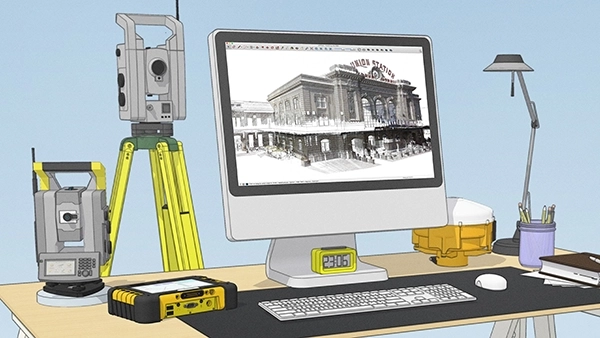
This new Trimble-made extension for SketchUp now gives you the ability to import, view, and model from point cloud data in SketchUp.

This is going to change the way you work – even if you have never used SketchUp before or you’re a SketchUp Ninja!

Who is it for?

Trimble Scan Essentials is built for professionals who need precision and speed—whether you’re working on renovations, new builds or complex BIM projects.

Why choose Trimble Scan Essentials?

  • Direct point cloud integration
    Import and manage scan data straight into SketchUp—no need for extra software or complex workflows.
  • Precision modelling made easy
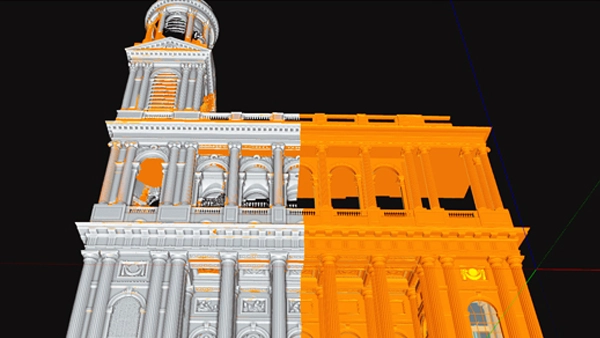
    Snap and draw directly on point clouds using native SketchUp tools for accurate as-built models.
  • Supports industry-standard formats
    Compatible with LAS, LAZ, E57, PLY and more, ensuring flexibility across your projects.
  • Powerful visual controls
    Adjust colour, transparency and visibility with the Point Cloud Manager for clear, focused modelling.
  • Accuracy you can trust
    Use the inspection tool to compare your model against the scan and eliminate costly errors.
  • Optimised for large datasets
    Handle big point clouds efficiently without slowing down your workflow.
  • Ideal for renovation and BIM
    Perfect for capturing existing conditions and integrating them into design and construction phases.

Trimble Scan Essentials – Benefits

High-Quality 3D Scanning: Advanced 3D scanning capabilities, allowing users to capture high-resolution and accurate scans of physical environments, structures, or objects.

Efficient Data Capture: The software may streamline the process of capturing spatial data, reducing the time and effort required for surveying or creating detailed 3D models.

Point Cloud Processing: Tools for processing and managing point cloud data. Point clouds are collections of data points in 3D space, often generated by 3D scanners, and they serve as the foundation for creating detailed models.

Integration with Other Tools: It’s common for scanning software to integrate with other Trimble or third-party software tools, facilitating a more comprehensive workflow for users involved in geospatial and surveying tasks.

Visualisation and Analysis: Visualisation tools that allow users to explore and analyse 3D models or point cloud data. This can be crucial for making informed decisions based on the captured information.

Data Accuracy and Precision: Trimble is known for providing precise and accurate positioning solutions. Trimble’s expertise ensures high levels of accuracy in 3D scanning and surveying applications.

User-Friendly Interface: A user-friendly interface can enhance the overall user experience, making it easier for professionals in various industries to adopt and use the software effectively.

Compatibility and Scalability: Works seamlessly with other Trimble products and may be scalable to accommodate different project sizes and complexities.

System Overview

Features

  • Places point clouds directly into SketchUp allowing for rapid modelling.
  • Works with standardised point clouds (LAS, E57) and Trimble RealWorks projects.
  • Extensive integrated tool board with controls for visibility and selectability.

System Requirements 

  • Operating System: Microsoft Windows 8.1, 10 – 64-bit.
  • Processor: minimum 2.8 GHz (Quad-Core) or higher.
  • RAM: minimum 16 GB.
  • VGA card: OpenGL 3.3 compatible with minimum 1 GB VRAM. OpenGL 4.4 with 3 GB VRAM recommended for best performance.
  • 3-button mouse.

What SketchUp license do I need? 

    • You need an active version of SketchUp Pro to use the Trimble Scan Essentials extension. 
    • Version 2019 or above. 
    • Don’t have SketchUp? Download our 30 Day trial, or buy now. 

FREQUENTLY ASKED QUESTIONS

Trimble Scan Essentials is a SketchUp extension that allows you to import, view and model directly on point cloud data, enabling accurate as-built modelling and visual context for projects.

It is included with SketchUp Studio and EDU subscriptions and can be downloaded from the Account Management Portal, Windows installer, or Extension Warehouse.

Scan Essentials supports industry-standard formats such as E57, LAS, LAZ, TZF, RWP, and PLY, ensuring compatibility with Trimble RealWorks and other third-party software.

Windows 8.1, 10 or 11 (64-bit), minimum 2.8 GHz quad-core processor, 16 GB RAM, and an OpenGL 3.3 compatible GPU (OpenGL 4.4 with 3 GB VRAM recommended).

It is Windows-only, but can run on Mac using Bootcamp.

Install via the Extension Manager in SketchUp, then restart SketchUp. Additional dialogs may appear to complete setup.

  • Import and manage point clouds.
  • Snap and model accurately using SketchUp tools.
  • Point Cloud Manager for colour and transparency.
  • Inspection tool for model-to-scan accuracy.
  • Clipping box for focused modelling.

Yes, it integrates seamlessly with Trimble RealWorks, Trimble Business Center, and scanners like Trimble X7, SX10, TX8, TX6.

Ideal for renovation, BIM, and construction projects, enabling accurate as-built modelling and efficient integration from site survey to design and documentation.